KDE PowerDevil Systemd Inhibit

Work around Powerdevil for systemd suspend/hibernate inhibitors

With KDE 6.5.0, PowerDevil has broken forced its own set of suspend/hibernate inhibitors onto logind. And to my knowledge, there’s no way to disable them.

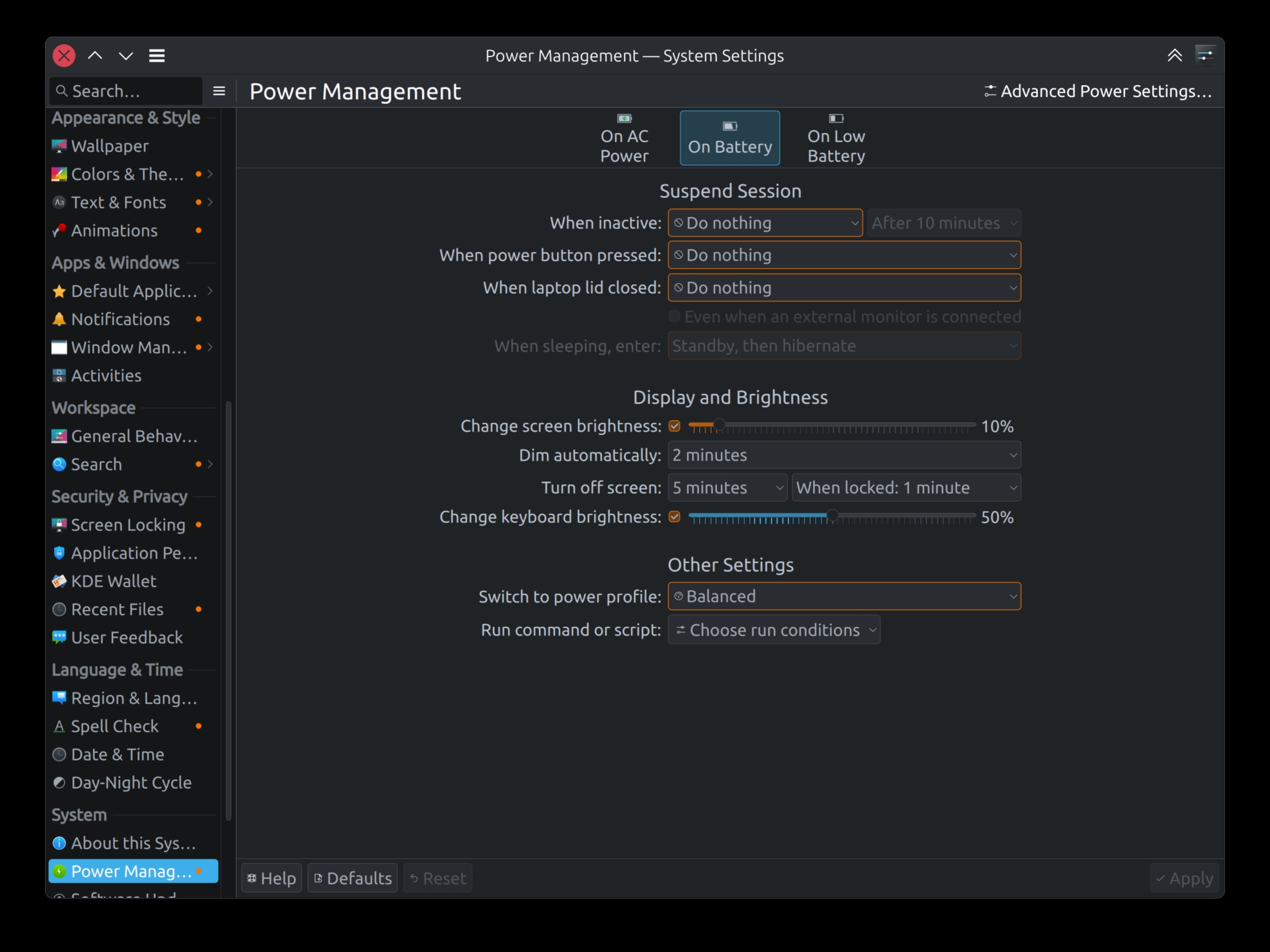
KDE PowerDevil Settings Window

As a user, I’d prefer to set lid action as Do nothing and really expect KDE/PowerDevil to do nothing in that regard. But with KDE 6.5.0 PowerDevil forces those inhibitors whatsoever.

❯ systemd-inhibit  --list
WHO            UID  USER PID   COMM            WHAT                                                                       WHY                                                        >
ModemManager   0    root 3541  ModemManager    sleep                                                                      ModemManager needs to reset devices                        >
NetworkManager 0    root 3453  NetworkManager  sleep                                                                      NetworkManager needs to turn off networks                  >
UPower         0    root 4342  upowerd         sleep                                                                      Pause device polling                                       >
PowerDevil     1000 rrs  82735 org_kde_powerde handle-power-key:handle-suspend-key:handle-hibernate-key:handle-lid-switch KDE handles power events                                   >
Screen Locker  1000 rrs  4844  kwin_wayland    sleep                                                                      Ensuring that the screen gets locked before going to sleep >

5 inhibitors listed.

This essentially prohibits logind to act on the lid actions. And instead forces the user to depend on nothing else and other than PowerDevil. This assumes the wishful thought that PowerDevil is Solid.

[Read More]
Categories: Debian-Blog Computing KDE  Tags: Linux systemd KDE PowerDevil 

Kget Goodness

Dear Google - KISS

Why is it so hard to have a proper download manager in today’s day ? We had it in the previous decade. Or do tech giants self-proclaim that the world lives only in their cloud.

At one point, there used to be great download managers for all major web browsers, either in-built, or external. Then came the latest trend with Chrome and Firefox, where they make it difficult to have an external download manager work proper. On either one’s extension store, I find it difficult to see a proper download manager.

[Read More]

Linux Tablet-Mode Usability

In my ongoing quest to get Tablet-Mode working on my Hybrid machine, here’s how I’ve been living with it so far. My intent is to continue using Free Software for both use cases. My wishful thought is to use the same software under both use cases.

  • Browser: On the browser front, things are pretty decent. Chromium has good support for Touchscreen input. Most of the Touchscreen use cases work well with Chromium. On the Firefox side, after a huge delay, finally, Firefox seems to be catching up. Hopefully, with Firefox 51/52, we’ll have a much more usable Touchscreen browser.
  • Desktop Shell: One of the reason of migrating to GNOME was its touch support. From what I’ve explored so far, GNOME is the only desktop shell that has touch support natively done. The feature isn’t complete yet, but is fairly well usable.
    • Given that GNOME has touchscreen support native, it is obvious to be using GNOME equivalent of tools for common use cases. Most of these tools inherit the touchscreen capabilities from the underneath GNOME libraries.
    • File Manager: Nautilus has decent support for touch, as a file manager. The only annoying bit is a right-click equivalent. Or in touch input sense, a long-press.
    • Movie Player: There’s a decent movie player, based on GNOME libs; GNOME MPV. In my limited use so far, this interface seems to have good support. Other contenders are:
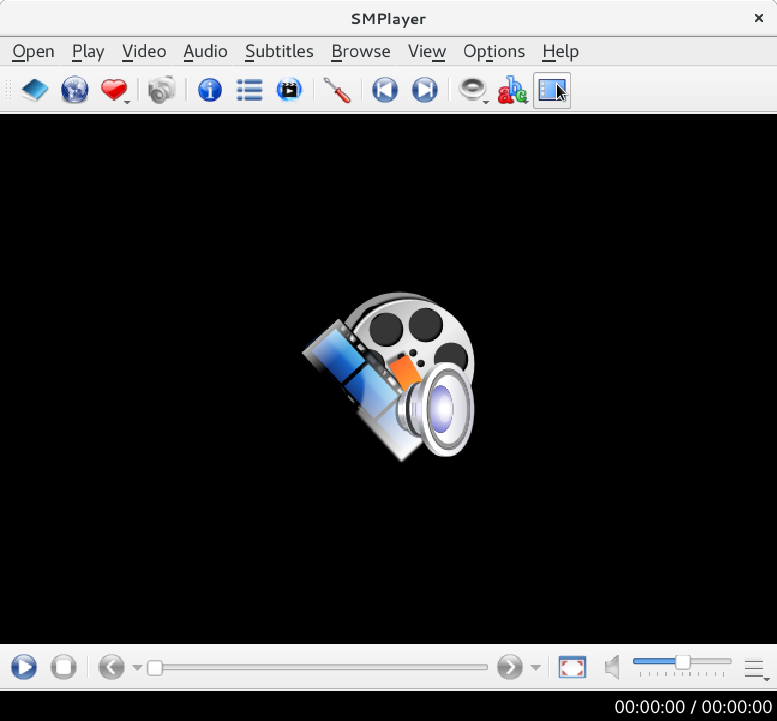
      • SMPlayer is based on Qt libs. So initial expectation would be that Qt based apps would have better Touch support. But I’m yet to see any serious Qt application with Touch input support. Back to SMPlayer, the dev is pragmatic enough to recognize tablet-mode users and as such has provided a so called “Tablet Mode” view for SMPlayer (The tooltip did not get captured in the screenshot).
      • MPV doesn’t come with a UI but has basic management with OSD. And in my limited usage, the OSD implementation does seem capable to take touch input.
  • Books / Documents: GNOME Documents/Books is very basic in what it has to offer, to the point that it is not much useful. But since it is based on the same GNOME libraries, it enjoys native touch input support. Calibre , on the other hand, is feature rich. But it is based on (Py)Qt. Touch input is told to work for Windows. For Linux, there’s no support yet. The good thing about Calibre is that it has its own UI, which is pretty decent in a Tablet-Mode Touch workflow.
  • Photo Management: With compact digital devices commonly available, digital content (Both Photos and Videos) is on the rise. The most obvious names that come to mind are Digikam and Shotwell.
    • Shotwell saw its reincarnation in the recent past. From what I recollect, it does have touch support but was lacking quite a bit in terms of features, as compared to Digikam.
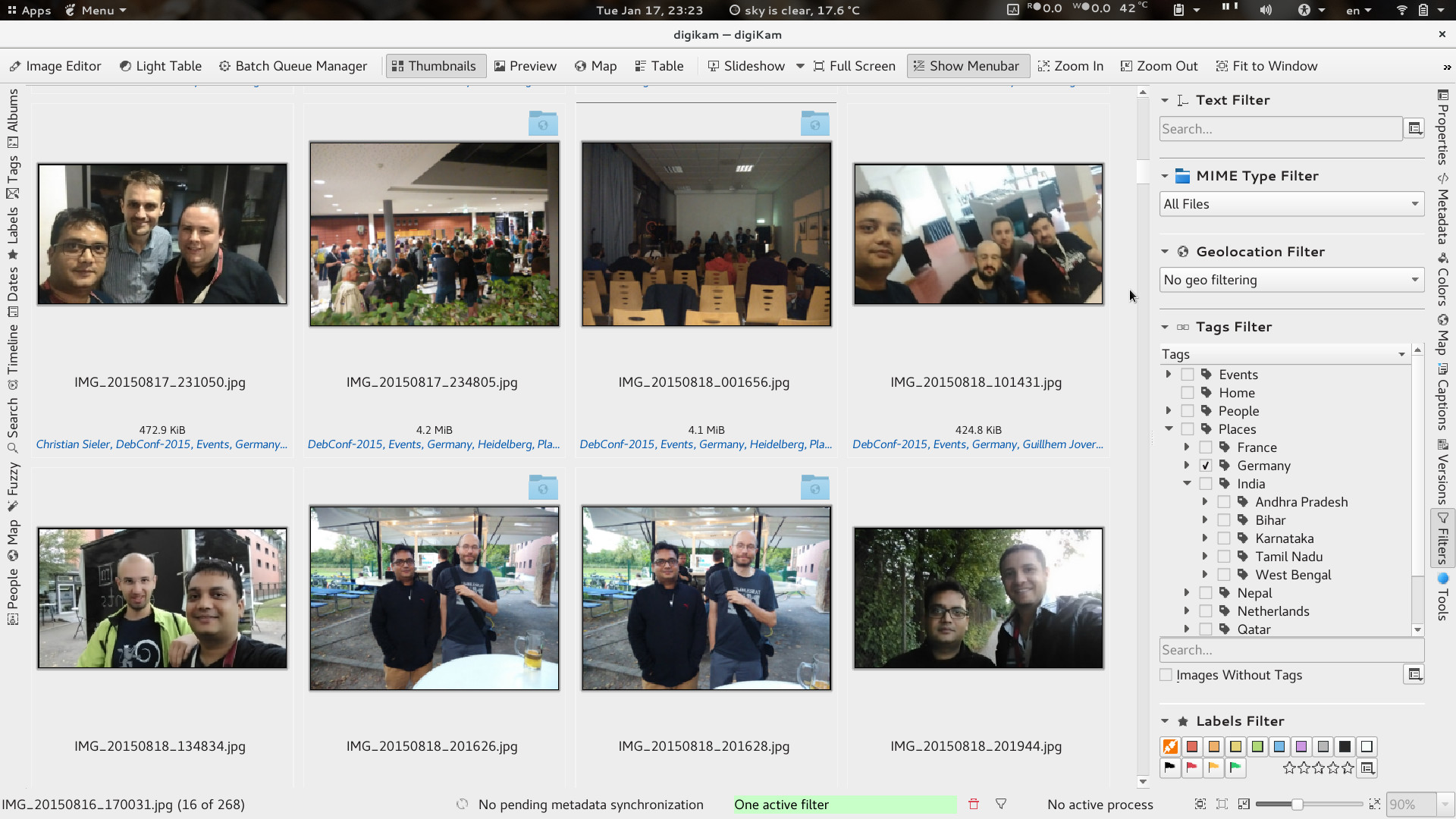
    • Digikam is an impressive tool for digital content management. While Digikam is a KDE project, thankfully it does a great job in keeping its KDE dependencies to a bare minimum. But given that Digikam builds on KDE/Qt libs, I haven’t had any much success in getting a good touch input solution for Tablet Mode. To make it barely usable in Table-Mode, one could choose a theme preference with bigger toolbars, labels and scrollbars. This helps in making a touch input workaround use case. As you can see, I’ve configured the Digikam UI with Text alongside Icons for easy touch input.
  • Email : The most common use case. With Gmail and friends, many believe standalone email clients are no more a need. But there always are users like us who prefer emails offline, encrypted emails and prefer theis own email domains. Many of these are still doable with free services like Gmail, but still.
    • Thunderbird shows its age at times. And given the state of Firefox in getting touch support (and GTK3 port), I see nothing happening with TB.
    • KMail was something I discontinued while still being on KDE. The debacle that KDEPIM was, is something I’d always avoid, in the future. Complete waste of time/resource in building, testing, reporting and follow-ups.
    • Geary is another email client that recently saw its reincarnation. I recently had explored Geary. It enjoys similar benefits like the rest applications using GNOME libraries. There was one touch input bug I found, but otherwise Geary’s featureset was limited in comparison to Evolution.
    • Migration to Evolution , when migrating to GNOME, was not easy. GNOME’s philosophy is to keep things simple and limited. In doing that, they restrict possible flexibilities that users may find obvious. This design philosophy is easily visible across all applications of the GNOME family. Evolution is no different. Hence, coming from TB to E was a small unlearning + newLearning curve. And since Evolution is using the same GNOME libraries, it enjoys similar benefits. Touch input support in Evolution is fairly good. The missing bit is the new Toolbar and Menu structure that many have noticed in the newer GNOME applications (Photos, Documents, Nautilus etc). If only Evolution (and the GNOME family) had the option of customization beyond the developer/project’s view, there wouldn’t be any wishful thoughts.
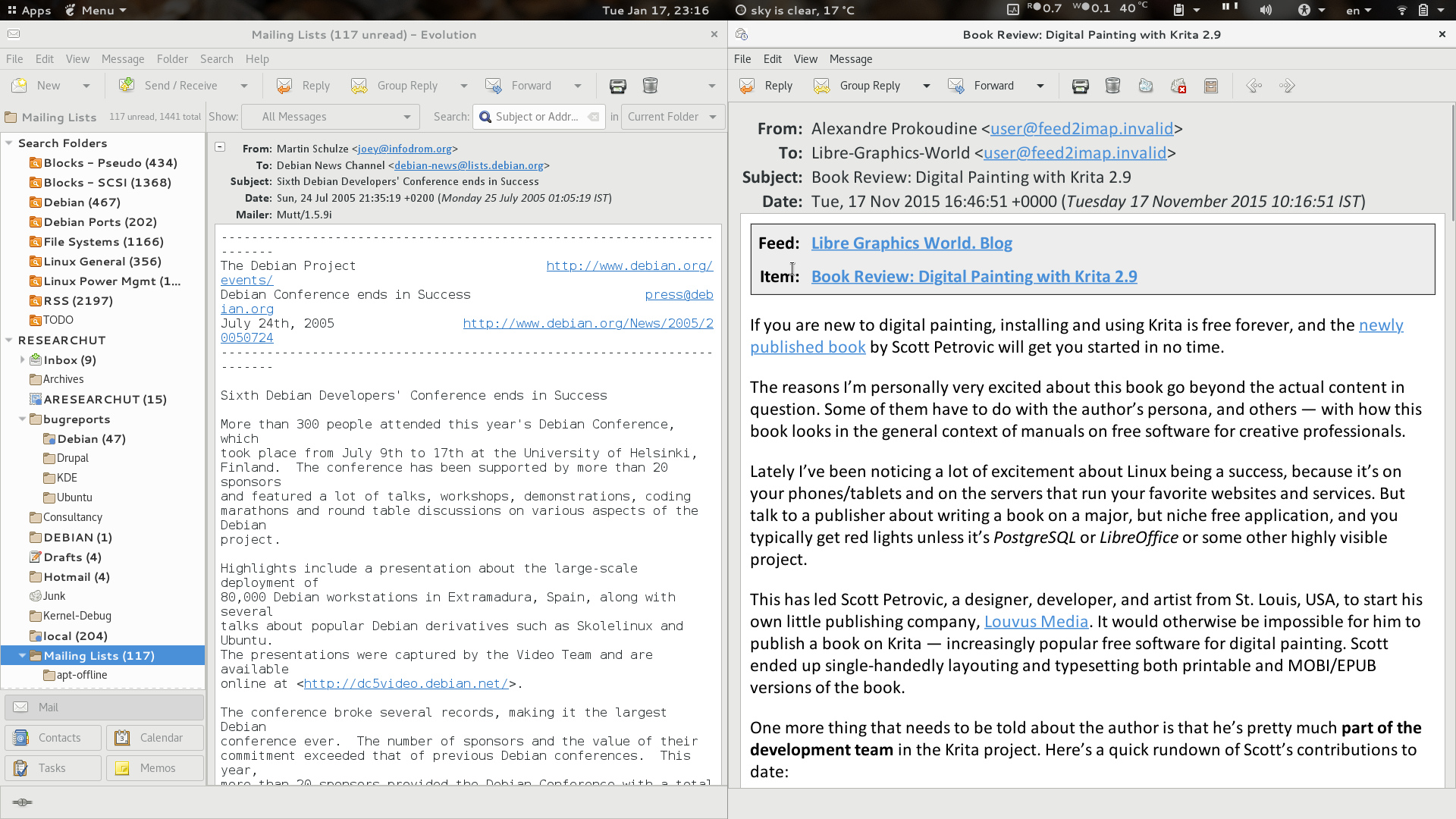
      • Above is a screenshot of 2 windows of Evoluiton. In its current form too, Evolution is a gem at times. For my RSS feeds, they are stored in a VFolder in Evolution, so that I can read them when offline. RSS feeds are something I read up in Tablet-mode. On the right is an Evolution window with larger fonts, while on the left, Evoltuion still retains its default font size. This current behavior helps me get Table-Mode Touch working to an extent. In my wishful thoughts, I wish if Evolution provided flexibility to change Toolbar icon sizes. That’d really help easily touch the delete button when in Tablet Mode. A simple button, Tablet Mode , like what SMPlayer has done, would keep users sticky with Evolution.

My wishful thought is that people write (free) software, thinking more about usability across toolkits and desktop environments. Otherwise, the year of the Linux desktop , laptop , tablet; in my opinion, is yet to come. And please don’t rip apart tools, in porting them to newer versions of the toolkits. When you rip a tool, you also rip all its QA, Bug Reporting and Testing, that was done over the years.

[Read More]
Kscope 1.6

In the 3.x days of KDE, there were some wonderful applications. One of them I still admire, is kscope. Recently, I stumbled upon this blog entry and thought of sharing my living with kscope.

The move from KDE 3 to KDE 4 was a big one. During that move, the kscope author decided to port kscope to a Qt only application. That is what we have as the latest kscope, 1.9x version. But, on personal taste, it is not as good as the 1.6x series.

[Read More]
Categories: Debian-Blog KDE Tools  Tags: KDE kscope 

Microsoft, Nokia and Qt

Nokia has [announced](http://blog.qt.nokia.com/2011/03/07/nokia-and-digia- working-together/) that it is selling off its Qt business. This needed to happen given the change in the company’s strategy. Microsoft is a software vendor providing Mobile OS, with Nokia being one of its consumers. For Nokia, to have a tier 1 alliance with Microsoft, it would have been important for the company to show positive gesture. With this move, Microsoft and Nokia will strengthen their partnership. This move will focus on tighter integration in between the 2 company’s portfolios.

[Read More]
Categories: Debian-Blog General KDE  Tags: Nokia Microsoft Qt KDE 

Icedove

My recent experience with Mozilla ThuderBird, IceDove.

With KDE 4.x, the KDE team took a radical step of ripping apart most of the stuff and rethinking many of the designs. Quite a bold move. Many people appreciated KDE’s efforts to start afresh while others moved away from KDE. For some reasons, I decided to stick to KDE. Maybe it was because of the awesome flexibility KDE provided provides to customize the DE to one’s personal taste. Or maybe because I was too used to the KDE way of doing things. I stayed with KDE while 4.0 was released and stayed with it up till very recently.

[Read More]
Categories: Tools KDE Rant  Tags: KDE kmail knode Icedove Akregator 

The Automatic Equalizer for Android

When I wrote the [autoEqualizer ](http://kde- apps.org/content/show.php/autoEqualizer?content=70509 “autoEqualizer”)plug-in for the Amarok (1.x) media player, to the best of my knowledge, there weren’t any media players with this feature nor were there any plug-ins.

Recently, I came to know that the Samsung Galaxy S ’s media player looks to be having the Automatic Equalizer functionality. Not sure if this player is specific to Samsung Galaxy S or the Android Platform in general.

[Read More]
Categories: Tools KDE  Tags: amarok autoEqualizer 

Evolution Newsgroup UI

I’ve been using KDE for a while now, probably 9yrs. I’ve also been an early adopter of KDE 4.x. While KDE 4 is still far way behind in proving its worth of the radical core changes it made (take for example: Nepomuk, Strigi, Phonon, Decibel - I still wonder when they are going to be ready for the user), I still find KDE apps far far ahead of GNOME.

Probably, many would disagree. Possibly, they might flame me too.I mean everyone supports GNOME as the default - Red Hat/Novell/Ubuntu. And I always wonder WHY.

[Read More]
Categories: Tools KDE Rant Computing  Tags: KDE knode evolution gnome 

Migrating from KDE3 to KDE 4.1

Yay!! First of all, Thank you.

I think now is the time most of the KDE users are going to migrate to KDE 4.1. KDE 4.1 looks so tempting that I really can’t wait. So while I compose this blog post, apt is doing all the needful to download the KDE4.1 packages from Debian Experimental. That doesn’t mean I wasn’t following KDE 4.x. While, becuasae of resource constraints, Debian made a wise choice of sticking to just a single KDE version (i.e. KDE3 in testing and KDE4 in unstable/experimental), there still are many ways to be able to test KDE 4.x. And by ways , I don’t mean a VM or a Live CD. You can definitely do a much better and realistic testing of KDE4 on your production box without fearing of screwing your current KDE 3.x installation. At Debian Wiki, there’s a cool howto describing how to do it. If you follow the wiki howto properly, you should even be able to test bling features like KWin’s Composite and Plasma.

[Read More]
Categories: KDE 

KMail HAM Handling

I have been a long time KMail user and love this email client. It has most of the features that I care about, like Message Threading, Spam Filtering, Disconnected IMAP et cetera.

KMail has good integration with SPAM Handling softwares like spamassassin and bogofilter. The KMail wizard will autoconfigure spamassassin, bogofilter and others (as detected from your installation). The default settings were a little annoying because messages detected as SPAM were re- written with the SPAM Heading. The problem was when spamassassin mis-judged a genuine message as SPAM. Well, we could mark it as HAM, but the added heading never went off.

[Read More]
Categories: KDE  Tags: kmail