Immutable Atomic Linux Distirbutions
Of late, I’ve been hearing a lot of (good) things about Immutable Linux Distributions, from friends, colleagues and mentors. It has been something on my plate for some time, to explore. But given the nature of the subject, it has been delayed for a while. Reasons are simple; I can only really judge this product if I use it for some time; and it has to be on my primary daily driver machine.
Personal life, this year, has been quite challenging as well. Thus it got pushed to until now.
Chrome OS
I’ve realized that I’ve been quite late to a lot of Linux parties. Containers, Docker, Kubernetes, Golang, Rust, Immutable Linux and many many more.
Late to the extent that I’ve had a Chrome Book lying at home for many months but never got to tinker with it at all.
Having used it for just around 2 weeks now, I can see what a great product Google built with it. In short, this is exactly how a Linux desktop integration should be. The GUI integration is just top notch. There’s consistency across all applications rendered on the Chrome OS
The integration of [X]Wayland and friends is equally good. Maybe Google should consider opensourcing all those components. IIRC, exo, sommelier, xwayland, ash and many more.
I was equally happy to see their Linux Development Environment
offering on supported hardware. While tightly integrated, it still
allows power users to tinker things around. I was quite impressed to see
nested containers in crostini. Job well done.
All of this explains why there’s much buzz about Immutable Atomic Linux Distributions these days.
Then, there’s the Android integration, which is just awesome in case you
care of it. Both libndk and libhoudini are well integrated and
nicely usable.
Immutable Linux Distributions
This holiday season I wanted to find and spend some time catching up on stuff I had been prolonging.
I chose to explore this subject while trying to remain in familiar Debian land. So my first look was to see if there was any product derived out of the Debian base.
That brought me to Vanilla OS Orchid. This is a fresh out of oven
project, recently switched to being based on Debian Sid. Previous
iteration used Ubuntu as the base.
Vanilla OS turned out to be quite good an experience. The stock offering is created well enough to serve the general audience. And the framework is such wonderfully structured that seasoned users can tinker around with it, without much fuss.
Vanilla OS uses an A/B Partition model for how system updates are rolled. At any point, when a new OTA update is pushed, it gets applied to the inactive A/B partition. And it gets activated at next boot. If things break, user has the option to switch to the previous state. Just the usual set of expectations one would have with an immutable distribution.
What they’ve done beautifully is:
- Integration Device Mapper LVM for A/B Partition
- Linux Container OCI images to provison/flash A/B Paritions
- Developed
abrootutility for A/B Partition management - APX (Distrobox) integration for container workflows, with multiple Linux flavors
- No
sudo. Everything done viapkexec
But the most awesome thing I liked in Vanilla OS is custom images. This allows power users to easily tinker with the developer workflow and generate new images, tailored for their specific use cases. All of this done levraging the GitHub/GitLab CI/CD workflows, which I think is just plain awesome. Given that payload is of the OCI format, the CICD workflow just generates new OCI images and publishes to a registry. And then the same is pulled to the client as an OTA.
Hats off to this small team/community for doing such nice integration work, ultimately producing a superb Immutable Atomic Linux Distribution based on the Debian base.
Immutable Linux
My primary work machine has grown over the years, being on the rolling Debian Testing/Unstable channel. And I don’t much feel the itch ever to format my (primary) machine so quick, no matter how great the counter offer is.
So that got me wondering how to have some of bling of the immutable world that I’ve tasted (Thanks Chrome OS and Vanilla OS). With a fair idea of what they offer in features, I drew a line to what I’d want on my primary machine.
- read-only rootfs
- read-only /etc/
This also kinda hardens my systems to an extent that I can’t accidentally cause catastrophic damage to it.
The feature I’m letting go of is the A/B Partition (rpm-ostree for Fedora land). While a good feature, having to integrate it into my current machine is going to be very very challenging.
I actually feel that, the core assumption the Immutable Distros make,
that all hardware is going to Just Work, is flawed. While Linux has
substantially improved over the past years, there’s still a hit/miss
when introducing very recent hardware.
Immutable Linux is targeted for the novice user, who won’t accidentally mess with the system. But what would the novice user do in case they have issues with their recently purchased hardware, that they are attempting to run (Immutable) Linux on.
Ritesh’s Immutable Debian
With the premise set, on to sailing in immutable land.
There’s another ground breaking innovation that has been happening; which I think everyone is aware of. And may be using it as well, direct or indirect.
Artificial Intelligence
While I’ve only been a user for a couple of months as I draft this post, I’m now very much impressed with all this innovation. Being at the consumer end has me appreciating it for what it has offered thus far. And I haven’t even scratched the surface. I’m making attempts at developing understanding of Machine Learning and Artificial Intelligence but there’s a looonnngg way to go still.
What I’m appreciating the most is the availability of the AI Technology. It has helped me be more efficient. And thus I get to use the gain (time) with family.
To wrap, what I tailored my primary OS to, wouldn’t have been possible without assistance from AI.
With that, I disclaim that the rest of this article is primarily drafted by my AI Companion. This is going to serve me as a reference for future, when I forget about how all of this was structured.
🏗️ System Architecture: Immutable Debian (Btrfs + MergerFS)
This system is a custom-hardened Immutable Workstation based on Debian Testing/Unstable. It utilizes native Btrfs properties and surgical VFS mounting to isolate the Operating System from persistent data.
1. Storage Strategy: Subvolume Isolation
The system resides on a LUKS-encrypted NVMe partition, using a flattened subvolume layout to separate the “Gold Master” OS from volatile and persistent data.
| Mount Point | Subvolume Path | State | Purpose |
|---|---|---|---|
/ | /ROOTVOL | RO | The core OS image. |
/etc | /ROOTVOL/etc | RO | System configuration (Snapshot-capable). |
/home/rrs | /ROOTVOL/home/rrs | RW | User data and Kitty terminal configs. |
/var/lib | /ROOTVOL/var/lib | RW | Docker, Apt state, and system DBs. |
/var/spool | /ROOTVOL/var/spool | RW | Mail queues and service state. |
/swap | /ROOTVOL/swap | RW | Isolated path for No_COW Swapfile. |
/disk-tmp | /ROOTVOL/disk-tmp | RW | MergerFS overflow tier. |
1.1 /etc/fstab
❯ cat /etc/fstab
# /etc/fstab: static file system information.
#
# Use 'blkid' to print the universally unique identifier for a
# device; this may be used with UUID= as a more robust way to name devices
# that works even if disks are added and removed. See fstab(5).
#
# <file system> <mount point>   <type>  <options>       <dump>  <pass>

# --- ROOT & BOOT ---
/dev/mapper/nvme0n1p3_crypt  /  btrfs  autodefrag,compress=zstd,discard=async,noatime,defaults,ro  0  0
/dev/nvme0n1p2               /boot      ext4    defaults        0  2
/dev/nvme0n1p1               /boot/efi  vfat    umask=0077      0  1

# --- SWAP ---
# Mount the "Portal" to the swap subvolume using UUID (Robust)
UUID=4473b40b-bb46-43d6-b69c-ef17bfcac41c  /swap  btrfs  subvol=/ROOTVOL/swap,defaults,noatime  0  0

# Activate the swap file by path (Correct for files)
/swap/swapfile  none  swap  defaults  0  0

# --- DATA / MEDIA ---
UUID=439e297a-96a5-4f81-8b3a-24559839539d  /media/rrs/TOSHIBA  btrfs  noauto,compress=zstd,space_cache=v2,subvolid=5,subvol=/,user

# --- MERGERFS ---
# --- DISK-TMP (MergerFS Overflow Tier) ---
# Ensure this ID matches your actual disk-tmp subvolume
UUID=4473b40b-bb46-43d6-b69c-ef17bfcac41c  /disk-tmp  btrfs  subvolid=417,discard=async,defaults,noatime,compress=zstd  0  0
tmpfs               /ram-tmp   tmpfs          defaults  0  0
/ram-tmp:/disk-tmp  /tmp       fuse.mergerfs  x-systemd.requires=/ram-tmp,x-systemd.requires=/disk-tmp,defaults,allow_other,use_ino,nonempty,minfreespace=1G,category.create=all,moveonenospc=true  0  0

# --- IMMUTABILITY PERSISTENCE LAYERS ---
# We explicitly mount these subvolumes so they remain Writable later.
# UUID is the same as your /var/lib entry (your main Btrfs volume).

# 1. /var/lib (Docker, Apt state) - ID 50659
UUID=4473b40b-bb46-43d6-b69c-ef17bfcac41c  /var/lib    btrfs   subvolid=50659,discard=async,defaults,noatime,compress=zstd  0  0

# 2. /home/rrs (User Data) - ID 13032
UUID=4473b40b-bb46-43d6-b69c-ef17bfcac41c  /home/rrs   btrfs   subvolid=13032,discard=async,defaults,noatime,compress=zstd  0  0

# 3. /etc (System Config) - ID 13030
UUID=4473b40b-bb46-43d6-b69c-ef17bfcac41c  /etc        btrfs   subvolid=13030,discard=async,defaults,noatime,compress=zstd,ro  0  0

# 4. /var/log (Logs) - ID 406
UUID=4473b40b-bb46-43d6-b69c-ef17bfcac41c  /var/log    btrfs   subvolid=406,discard=async,defaults,noatime,compress=zstd    0  0

# 5. /var/cache (Apt Cache) - ID 409
UUID=4473b40b-bb46-43d6-b69c-ef17bfcac41c  /var/cache  btrfs   subvolid=409,discard=async,defaults,noatime,compress=zstd    0  0

# 6. /var/tmp (Temp files) - ID 401
UUID=4473b40b-bb46-43d6-b69c-ef17bfcac41c  /var/tmp    btrfs   subvolid=401,discard=async,defaults,noatime,compress=zstd    0  0

# /var/spool
UUID=4473b40b-bb46-43d6-b69c-ef17bfcac41c  /var/spool  btrfs  subvolid=50689,discard=async,defaults,noatime,compress=zstd  0  0
2. Tiered Memory Model (/tmp)
To balance performance and capacity, /tmp is managed via MergerFS:
- Tier 1 (RAM):
tmpfsmounted at/ram-tmp. - Tier 2 (Disk): Btrfs subvolume mounted at
/disk-tmp. - Logic: Files are written to RAM first. If RAM falls below 1GB available, files spill over to the Btrfs disk tier.
3. Hibernation & Swap Logic
- Size: 33 GiB (Configured for Suspend-to-Disk with 24GB RAM).
- Attribute: The
/swapsubvolume is marked No_COW (+C). - Kernel Integration:
resume=UUID=...(Points to the unlocked LUKS container).resume_offset=...(Physical extent mapping for Btrfs).
3.1 systemd sleep/Hibernation
❯ cat /etc/systemd/sleep.conf.d/sleep.conf
[Sleep]
HibernateDelaySec=12min
and
❯ cat /etc/systemd/logind.conf.d/logind.conf
[Login]
HandleLidSwitch=suspend-then-hibernate
HandlePowerKey=suspend-then-hibernate
HandleSuspendKey=suspend-then-hibernate
SleepOperation==suspend-then-hibernate
4. Immutability & Safety Mechanisms
The system state is governed by two key components:
A. The Control Script (immutectl)
Handles the state transition by flipping Btrfs properties and VFS mount flags in the correct order.
sudo immutectl unlock: Setsro=falseand remountsrw.sudo immutectl lock: Setsro=trueand remountsro.
❯ cat /usr/local/bin/immutectl
#!/bin/bash

# Ensure script is run as root
if [[ $EUID -ne 0 ]]; then
   echo "This script must be run as root (sudo)."
   exit 1
fi

ACTION=$1

case $ACTION in
    unlock)
        echo "🔓 Unlocking / and /etc for maintenance..."

        # 1. First, tell the Kernel to allow writes to the mount point
        mount -o remount,rw /
        mount -o remount,rw /etc

        # 2. Now that the VFS is RW, Btrfs will allow you to change the property
        btrfs property set / ro false
        btrfs property set /etc ro false

        echo "Status: System is now READ-WRITE."
        ;;
    lock)
        echo "🔒 Locking / and /etc (Immutable Mode)..."
        sync

        btrfs property set / ro true
        btrfs property set /etc ro true

        # We still attempt remount, but we ignore failure since Property is the Hard Lock
        mount -o remount,ro / 2>/dev/null
        mount -o remount,ro /etc 2>/dev/null

        echo "Status: System is now READ-ONLY (Btrfs Property Set)."
        ;;
    status)
        echo "--- System Immutability Status ---"

        for dir in "/" "/etc"; do
            # Get VFS state
            VFS_STATE=$(grep " $dir " /proc/mounts | awk '{print $4}' | cut -d, -f1)

            # Get Btrfs Property state
            BTRFS_PROP=$(btrfs property get "$dir" ro | cut -d= -f2)

            # Determine overall health
            if [[ "$BTRFS_PROP" == "true" ]]; then
                FINAL_STATUS="LOCKED (RO)"
            else
                FINAL_STATUS="UNLOCKED (RW)"
            fi

            echo "Path: $dir"
            echo "  - VFS Layer (Mount): $VFS_STATE"
            echo "  - Btrfs Property:    ro=$BTRFS_PROP"
            echo "  - Effective State:   $FINAL_STATUS"

            # Check for mismatch (The "Busy" scenario)
            if [[ "$VFS_STATE" == "rw" && "$BTRFS_PROP" == "true" ]]; then
                echo "  ⚠️  NOTICE: VFS is RW but Btrfs is RO. System is effectively Immutable."
            fi
            echo ""
        done
        ;;
    *)
        echo "Usage: $0 {lock|unlock|status}"
        exit 1
        ;;
esac
B. The Smart Seal (immutability-seal.service)
A systemd one-shot service that ensures the system is locked on boot.
- Fail-safe: The service checks
/proc/cmdlinefor the standalone wordrw. If found (via GRUB manual override), the seal is aborted to allow emergency maintenance.
❯ cat /etc/systemd/system/immutability-seal.service
[Unit]
Description=Ensure Btrfs Immutable Properties are set on Boot (unless rw requested)
DefaultDependencies=no
After=systemd-remount-fs.service
Before=local-fs.target
# Don't run in emergency/rescue modes
#ConditionPathExists=!/run/systemd/seats/seat0

[Service]
Type=oneshot
# The robust check: exit if 'rw' exists as a standalone word
ExecStartPre=/bin/sh -c '! grep -qE "\brw\b" /proc/cmdline'
ExecStartPre=mount -o remount,rw /
ExecStart=/usr/bin/btrfs property set / ro true
ExecStart=/usr/bin/btrfs property set /etc ro true
ExecStartPost=mount -o remount,ro /
RemainAfterExit=yes

[Install]
WantedBy=local-fs.target
5. Monitoring & Maintenance
- Nagging: A systemd user-timer runs
immutability-nagevery 15 minutes to notify the desktop session if the system is currently in an “Unlocked” state. - Verification: Use
sudo immutectl statusto verify that both the VFS Layer and Btrfs Properties are in sync.
5.1 Nagging
❯ cat ~/bin/immutability-nag
#!/bin/bash
# Check Btrfs property
BTRFS_STATUS=$(btrfs property get / ro | cut -d= -f2)

if [[ "$BTRFS_STATUS" == "false" ]]; then
    # Use notify-send (Standard, fast, non-intrusive)
    notify-send -u critical -i security-low \
    "🔓 System Unlocked" \
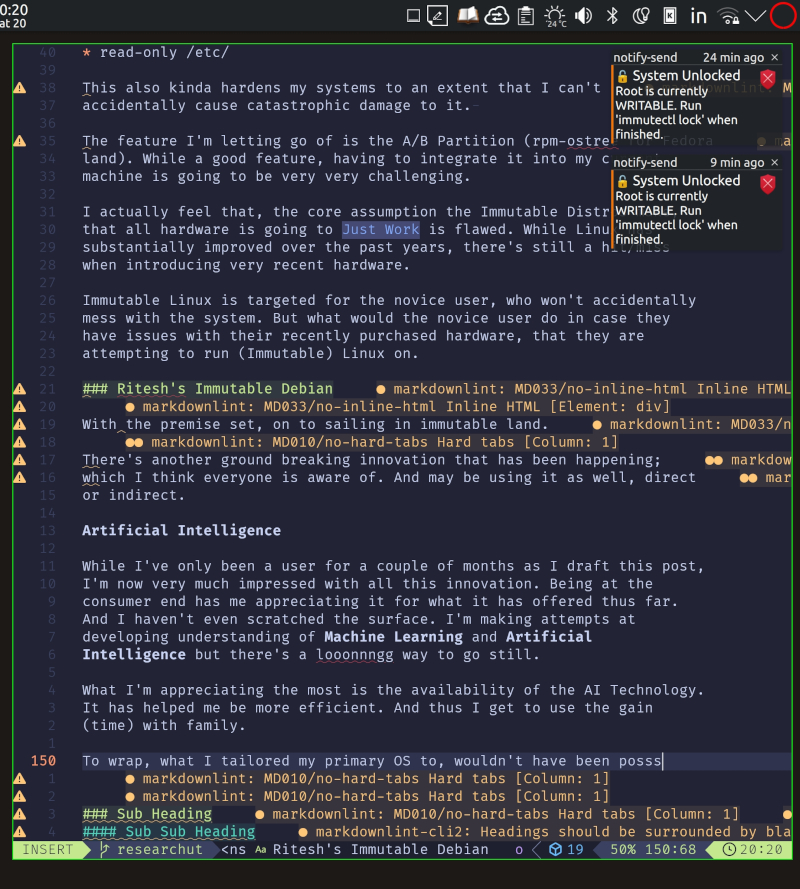
    "Root is currently WRITABLE. Run 'immutectl lock' when finished."
fi
and
❯ usystemctl cat immutability-nag.service
# /home/rrs/.config/systemd/user/immutability-nag.service
[Unit]
Description=Check Btrfs immutability and notify user
# Ensure it doesn't run before the graphical session is ready
After=graphical-session.target
[Service]
Type=oneshot
ExecStart=%h/bin/immutability-nag
# Standard environment for notify-send to find the DBus session
Environment=DBUS_SESSION_BUS_ADDRESS=unix:path=/run/user/%U/bus
[Install]
WantedBy=default.target
~ 20:35:15
❯ usystemctl cat immutability-nag.timer
# /home/rrs/.config/systemd/user/immutability-nag.timer
[Unit]
Description=Check immutability every 15 mins
[Timer]
OnStartupSec=5min
OnUnitActiveSec=15min
[Install]
WantedBy=timers.target
And the resultant nag in action.
5.2 Verification
❯ sudo immutectl status
[sudo] password for rrs:
--- System Immutability Status ---
Path: /
- VFS Layer (Mount): rw
- Btrfs Property: ro=false
- Effective State: UNLOCKED (RW)
Path: /etc
- VFS Layer (Mount): rw
- Btrfs Property: ro=false
- Effective State: UNLOCKED (RW)
~ 21:14:08
❯ sudo immutectl lock
🔒 Locking / and /etc (Immutable Mode)...
Status: System is now READ-ONLY (Btrfs Property Set).
~ 21:14:15
❯ sudo immutectl status
--- System Immutability Status ---
Path: /
- VFS Layer (Mount): rw
- Btrfs Property: ro=true
- Effective State: LOCKED (RO)
⚠️ NOTICE: VFS is RW but Btrfs is RO. System is effectively Immutable.
Path: /etc
- VFS Layer (Mount): rw
- Btrfs Property: ro=true
- Effective State: LOCKED (RO)
⚠️ NOTICE: VFS is RW but Btrfs is RO. System is effectively Immutable.
Date Configured: December 2025
Philosophy: The OS is a diagnostic tool. If an application fails to write to a locked path, the application is the variable, not the system.
Wrap
Overall, I’m very very happy with, the result of a day of working together with AI. I wouldn’t have gotten things done so quick in such time if it wasn’t around. Such great is this age of AI.